My younger brother has a thing for car games. Not racing games; specifically, he doesn’t care about lap times or leaderboards. What he actually wants is to just drive, tinker with a car’s look, and mess around online with friends without the whole experience turning into a sweatfest. He’s been through CarX Street, Traffic Rider, and about a dozen others over the past year, and most of them either get boring fast or hit him with a paywall within two hours of playing.
So when he showed me Custom Cars: Online Drive a few months back and told me he’d been playing it every day for three weeks straight, I figured I should actually sit down and look at it properly, not just glance over his shoulder while he drove circles in a parking lot.
I put in a few hours on my own Xiaomi Redmi Note 13 Pro, watched him play on his Galaxy A34, and came back to it a second time specifically to write this. Here’s everything we found: the good, the frustrating, and the stuff nobody warns you about before you download.
Table of Contents
What Exactly Is Custom Cars: Online Drive?
Before getting into the review itself, let’s be clear about what kind of game this is because the name doesn’t tell the whole story.
Custom Cars: Online Drive is a free-to-play open-world driving simulator for Android. It’s developed by Etiket Games and available on the Google Play Store. The core idea is simple: you get a car, you customize it however you like, and then you drive around with other real players in a shared open world.
There’s no racing bracket. No strict objective. No final boss. You’re not grinding toward a championship. It’s closer to a social driving sandbox than a competitive game, which is exactly why my brother loves it and why some players bounce off it within the first session.
If you come in expecting something like Asphalt or Need for Speed, you’ll be confused. If you come in wanting something like GTA’s free-roam driving minus the crime, you’ll probably enjoy it.
First Impressions: The Download and Setup
The APK size on the Play Store sits around 500–600MB depending on your device and the current version, which is reasonable for what it offers. It doesn’t pull a bait-and-switch where it’s 100MB at install and then demands another 1.5GB download before you can actually play something a lot of mobile games do that drives me crazy.
Installation was smooth on both our devices. The first launch took about 30 seconds to load on the Redmi Note 13 Pro and closer to 50 seconds on the Galaxy A34, which is slightly older hardware. Neither crashed on startup.
You’re asked to create a username before you enter the world. There’s no forced account creation through Google or Facebook, which is a nice touch; you just pick a name and you’re in.
The opening screen drops you straight into the car selection. No long tutorial. No cutscene. Just: Here are some cars; pick one and go drive.
I genuinely liked that.
The Car Customization: This Is Where the Game Shines
This is the part that actually impressed me, and it’s clearly where the developers put most of their effort.
The customization system is deeper than it looks from screenshots. You can change:
- Body paint color (full color picker, not just preset swatches)
- Vinyl wraps and decals
- Wheel type and wheel color
- Window tint
- Ride height / suspension (lowering your car changes how it looks and slightly affects handling)
- Exhaust style
- Headlight and taillight color on some models
Some of these options are free from the start. Others require in-game currency, which you earn through driving and completing basic challenges. More on the monetization in a bit; it’s worth a separate section.
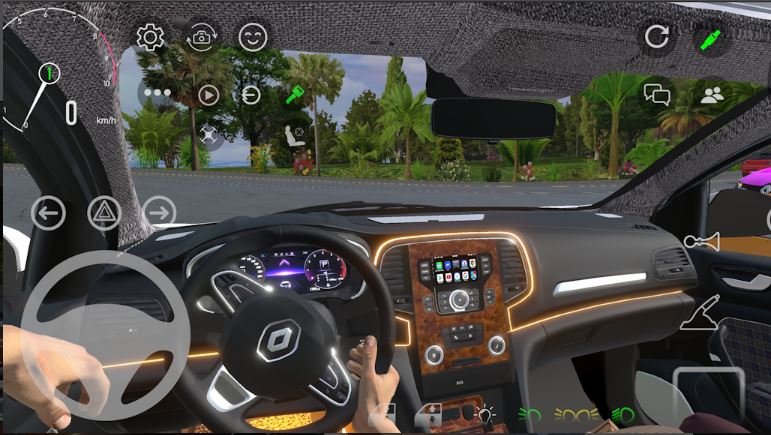
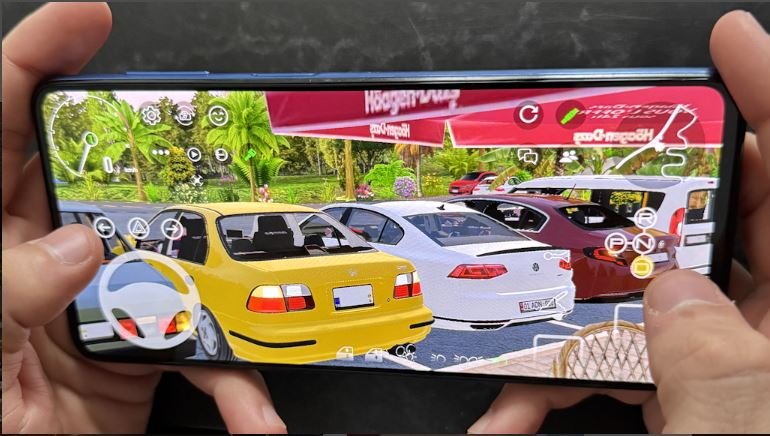
What surprised me was how much the customization actually affects the look of your car in the open world. When you drive past another player, their car genuinely looks different from yours. I saw someone rolling around in a matte black lowrider with gold rims and purple window tint, and it looked legitimately cool. Another player had a bright orange rally-style build with a roof scoop. It doesn’t feel like everyone’s driving the same default vehicle with a different coat of paint.
My brother spent his first 45 minutes just in the customization menu before he even drove anywhere. I thought that was overkill until I saw his finished build, a dark green muscle car with white racing stripes and chrome wheels. It looked sharp.
One honest limitation: the number of car models available in the free version is not huge. You get maybe 8–10 base cars to start, with more unlockable over time. If you’re expecting a full garage with 50 vehicles, you’ll be disappointed. The variety improves as you progress, but it takes time.
Get it from the Google Play Store
Driving Feel: Does It Actually Feel Good?
This matters a lot to me. I’ve played plenty of mobile driving games that look good in screenshots and feel awful to control.
Custom Cars: Online Drive uses a tilt and tap control system by default, but you can switch to on-screen buttons if you prefer. I always turn off tilt controls immediately in any game; tilt controls on mobile feel imprecise to me, and the button layout worked well enough.
The physics are arcade-style with a mild simulation lean. Meaning: Your car won’t drift like a physics toy, but it also won’t stick to roads like it’s on rails. There’s a satisfying weight to the steering. Corners require actual planning if you’re going fast. Hitting a curb at speed will noticeably unsettle the car.
It’s not BeamNG. But it’s not Subway Surfers either. It sits somewhere in the middle that feels appropriate for a mobile game.
One thing I genuinely liked: the environments have elevation changes. A lot of mobile open-world games are flat. Custom Cars has hills, mountain roads, and even some off-road areas. Driving downhill and feeling the car pick up speed, then having to brake into a corner that felt good in a way that flat-road driving games just don’t.
My brother discovered a long, winding mountain road on his second session and spent a full 20 minutes just driving up and down it while chatting with another player who was doing the same thing. That kind of organic moment is hard to manufacture. The game let it happen because the environment was interesting enough to support it.
The floaty feeling at very high speeds is a real complaint, though. Push your car above a certain speed and the handling gets noticeably less responsive. It doesn’t feel like going fast; it feels like the game is struggling to keep up with the physics calculations. This happened on both our devices, so I don’t think it’s hardware-specific.
Multiplayer: The Actual Online Experience
The online component is the whole reason the game exists, so this section matters.
In my experience, lobby fill time was between 15 and 45 seconds, which is acceptable. You’re dropped into a shared world with other real players, anywhere from 5 to 15 of them depending on server load when I played. Players show up as their customized cars with their username floating above the vehicle.
You can see other players, drive near them, and even informally race if you both decide to. There’s no formal PvP race mode; it’s purely freeform. Some people use the text chat to arrange impromptu races at specific road sections. Others just drive in parallel and seem to enjoy the shared presence without saying anything.
The chat system is basic but functional. You can type messages and they appear above your car. There are preset quick-chat options too (things like “Nice car!” or “Race?”) for players who don’t want to type while driving.
Server stability was mostly good during my sessions; I only had one disconnect in about four hours of total play. My brother mentioned he occasionally gets rubber-banding (where your car warps slightly on screen due to lag), especially on weekends when more players are online. It’s not constant, but it happens.
One feature I didn’t expect: you can drive alongside friends in the same lobby if they’re online at the same time. My brother and his friend used this to cruise together. It worked well and added a genuinely social dimension that I thought would be gimmicky but wasn’t.
Monetization: Is It Actually Free to Play?
This is where a lot of mobile games lose goodwill fast, so I want to be straight about it.
Custom Cars: Online Drive is free to download and play. You won’t hit a hard paywall that stops you from progressing. You can earn in-game currency (coins) by just playing, completing drives, logging in daily, and finishing simple challenges like “Drive 5 km without crashing.”
The things that cost real money (through in-app purchases) are mostly cosmetic:
- Premium car models not available for earned coins
- Exclusive paint jobs and wrap designs
- Faster currency accumulation (basically a “VIP” multiplier)
In two weeks of casual play, my brother unlocked three cars and a solid set of customization options using only earned coins. He didn’t spend a rupee. He did say that some of the nicest-looking cars are clearly locked behind real purchases, which is a fair criticism.
The ads are present, and I should mention them honestly. The game shows rewarded video ads; you can watch a short ad to earn bonus coins. These are optional and not forced. I did not experience any pop-up ads that interrupted gameplay, which surprised me positively. Most free mobile games are aggressive about ads mid-session. Custom Cars wasn’t, at least in my experience.
I’d call the monetization fair for a free mobile game. It’s not perfect, but it’s not predatory either.
Performance on Budget Devices
My brother’s Galaxy A34 has 6GB of RAM and a mid-range Exynos chip. The game ran at what felt like a stable 30fps on medium graphics settings. There was occasional stuttering when entering a new area of the map for the first time (likely loading assets), but it smoothed out quickly.
On my Redmi Note 13 Pro with the Snapdragon 7s Gen 2, it ran noticeably smoother, closer to 45–50 fps at the same settings. The game does have a graphics quality slider (Low / Medium / High / Ultra), and I found Medium to be the sweet spot that kept temperatures reasonable without sacrificing too much visual quality.
On very low-end devices (under 3GB RAM), I’d expect more aggressive frame drops, especially in multiplayer where rendering multiple customized cars simultaneously is more demanding. If you’re on an older budget device, try low graphics first and see how it runs before adjusting upward.
Battery drain at medium settings over one hour: approximately 15–18% on the Redmi. That’s on the higher side for a mobile game but not unusual for an online open-world title that’s constantly syncing with a server.
Things That Annoyed Me
I want to be honest here because no game is perfect, and a review that doesn’t mention problems isn’t useful.
The map feels smaller than the screenshots suggest. The environment looks impressive in promo material, but once you’ve driven for an hour you’ll start recognizing every road junction and shortcut. It’s not a truly vast open world it’s a medium-sized map with good variety. Developers seem to update it with new areas occasionally, but at the time of writing it did feel like I’d seen most of it within the first few sessions.
Some customization menus are unintuitive. I spent five minutes trying to figure out how to change my wheel color because the option was buried under a submenu that wasn’t labeled clearly. My brother figured it out by accident. A better UI here wouldn’t hurt.
No offline mode. If you have no internet connection, you simply can’t play. There’s no single-player offline session you can fall back on. For a game that’s fundamentally about driving around, this feels like a missed opportunity. Plenty of days you might want to just drive solo without loading into a multiplayer server.
Username changes are not straightforward. My brother picked a username in the first thirty seconds and immediately regretted it. There’s no obvious “change username” option in settings. He eventually found a workaround through the profile screen, but it wasn’t intuitive.
Who Is This Game Actually For?
After everything, here’s my honest read on who this game suits:
You’ll love it if:
- You enjoy the chill, unstructured feel of open-world driving without competitive pressure
- Car customization matters to you; spending time building a unique look is genuinely enjoyable here
- You want something social and relaxed to play with a friend online
- You’re on a mid-range Android phone and want a game that runs decently without a flagship device
You might bounce off it if:
You strongly dislike any form of in-app purchases even when they’re optional
You need objectives, missions, or structured progression to stay engaged
You’re looking for realistic simulation-level physics
You get frustrated by maps that feel limited after a few hours